


A shopper searching for a black oversized hoodie or a linen summer dress is already showing product interest. If your fashion store does not appear in relevant search results, another retailer may win that visit. Fashion E-commerce SEO helps online stores make products and collections easier to discover through search engines.
Good SEO is not limited to adding keywords to product descriptions. A complete fashion SEO strategy also includes useful page content, clear site navigation, descriptive images, mobile usability and technical settings. This guide covers practical ecommerce SEO optimization for fashion brands, with real examples you can adapt for product pages, collection pages and your clothing website SEO setup.
Whether you sell dresses, sneakers, kurtas or streetwear, the same principle applies: match each page to a specific shopper search, then give that shopper enough information to decide. The sections below include examples for titles, descriptions, alt text, URLs, structured data, collection pages and Shopify stores.
What is Fashion E-commerce SEO?
Fashion E-commerce SEO is the process of improving an online fashion store so its product, category and supporting pages can appear for relevant searches. It combines on-page SEO, technical SEO, content optimization and internal linking.
For example, a store selling women’s footwear could target a specific search such as “women’s white leather sneakers” on a matching product or collection page. A clear page gives shoppers useful information and helps search engines understand what the store offers.
Apparel SEO is another name for the same discipline, and you may also see it described as clothing website SEO. The goal is identical: make sure shoppers find the right product page or collection when they search with buying intent, such as “linen co-ord set for women” or “men’s black running shoes size 10”.
Why product page optimization matters
Product pages connect a shopper’s search with an item they can evaluate and purchase. A page with a clear product name, original description, accurate price, available sizes and useful images answers common buying questions.
Weak product pages often rely on short descriptions, repeated manufacturer text or missing details. These pages give shoppers little reason to choose the product. They also make it harder for search engines to distinguish similar items across a large catalogue.
Example: A page titled “Dress 08” with the description “Nice summer dress, available in sizes” gives shoppers and search engines very little to work with. A stronger version is named “Women’s Linen Midi Dress in Sage Green” and lists the fabric, length, fit and care instructions, with the full size range and a size guide.
Build a fashion SEO strategy first
Before editing individual pages, decide where your effort will have the most impact. A practical fashion SEO strategy for a growing store usually follows this order:
- Start with revenue pages. Pick your best-selling products and main collections first. For example, if linen dresses are your top seller, optimize the “Women’s Linen Dresses” collection and its five best-selling products before the rest of the catalogue.
- Map one search topic to each page. Give “women’s white leather sneakers” to a collection page and a specific item such as “Classic White Leather Low-Top Sneaker” to its product page, so your own pages do not compete with each other.
- Plan around seasons. Apparel SEO is seasonal. Prepare summer, festive and winter pages before shoppers start searching, and keep seasonal URLs stable from year to year where possible.
- Measure and repeat. Track organic clicks, impressions and sales for the pages you updated in Search Console and your analytics, then apply what worked to the next group of products.
Fashion product page optimization: step-by-step
1. Research keywords for each product
Start by identifying the words shoppers use when searching for your products. Include the product type, material, colour, fit, style and occasion where relevant. A product might suit a phrase such as “men’s relaxed fit cotton shirt” rather than a broad term like “shirts”.
Use keyword research tools and your own site-search data to find relevant phrases. Assign one main search topic to each product page. Use related phrases naturally in supporting copy, headings and image descriptions. Avoid placing the same keyword repeatedly just to increase its frequency.
Example keyword map for a women’s footwear store:
- Collection page: “women’s white leather sneakers”
- Product page: “women’s white leather low-top sneaker with cushioned sole”
- Supporting guide: “how to clean white leather sneakers”
Also cover the related terms shoppers use for the same item. A page about sneakers can naturally mention “trainers” or “casual shoes” where those words honestly describe the product. This semantic keyword coverage helps search engines understand the topic without repeating one phrase.
2. Write original product descriptions
Write descriptions that explain what makes each item useful or distinctive. Include details shoppers need, such as fabric, fit, pattern, care instructions and suitable occasions. Only include information that the brand can verify.
Avoid copying supplier descriptions across dozens of products. Similar text makes pages less distinctive and does not help shoppers compare items. Keep the writing natural, specific and easy to scan.
Example: A weak description reads: “Beautiful summer dress. Comfortable and stylish. Available in many colours.” A stronger one reads: “A knee-length midi dress in breathable linen, with a relaxed A-line fit, side pockets and a square neckline. Suitable for beach holidays, brunches and warm-weather workdays. Machine wash cold and line dry.” Use only details that match your actual product.
3. Create clear product titles and meta descriptions
Use a product title that identifies the item clearly. Include the main product phrase and a useful attribute when it fits naturally. For example, “Women’s Blue Floral Midi Dress” tells shoppers more than “Summer Collection 08”.
Write a unique meta description for important product pages. Summarize the item and its relevant features in a concise sentence. Search engines may choose a different snippet, so treat the description as guidance rather than a guaranteed search result.
- Weak title: “Summer Collection 08”
- Stronger title: “Women’s Blue Floral Midi Dress | Your Brand Name”
- Example meta description: “Shop a blue floral midi dress in lightweight cotton with a relaxed fit and side pockets. Available in sizes XS to XL.” Adjust the details to match your product.
4. Optimize product images and alt text
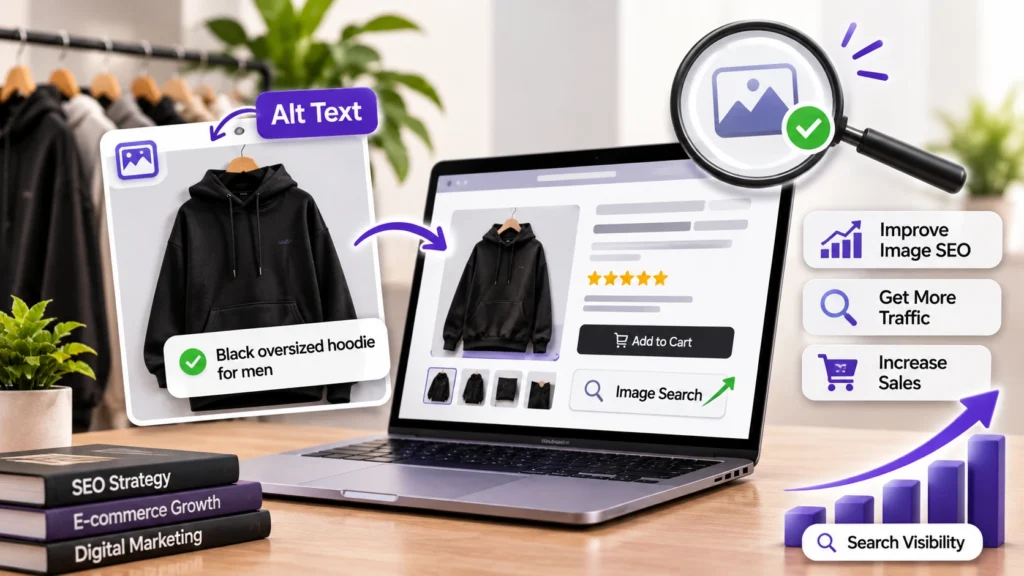
Fashion shoppers rely heavily on product images. Use clear photographs that show the item from useful angles, including close-ups where material or detailing matters. Keep image files appropriately compressed so they do not unnecessarily slow the page.
Write descriptive alt text for meaningful product images. For example, “Front view of a black oversized hoodie for men ” describes the image more clearly than “image123”. Do not stuff alt text with unrelated keywords. Decorative images can use empty alt text when appropriate.
- File name: black-oversized-hoodie-for-men-front.jpg instead of IMG_4821.jpg
- Alt text for the main image: “Front view of a black oversized hoodie for men on a hanger”
- Alt text for a detail shot: “Close-up of the drawstrings and front pocket on a black oversized hoodie”
5. Add accurate product structured data
Structured data is code that helps search engines interpret information on a page. Product markup can describe details such as the product name, price, availability and reviews when those details are present and eligible.
Follow Google’s Product structured data guidelines when implementing markup. Make sure the structured data matches the information shoppers can see on the page. Markup can make a page eligible for enhanced search appearances, but it does not guarantee that Google will display them.
Example: Simplified Product markup looks like this. Replace the values with your own and make sure they match what shoppers see on the page:
{
“@context”: “https://schema.org/”,
“@type”: “Product”,
“name”: “Women’s Blue Floral Midi Dress”,
“image”: “https://www.example.com/images/blue-floral-midi-dress-front.jpg”,
“description”: “Knee-length cotton midi dress with a floral print and side pockets.”,
“offers”: {
“@type”: “Offer”,
“price”: “2499.00”,
“priceCurrency”: “INR”,
“availability”: “https://schema.org/InStock”
}
}
Check the implementation with Google’s testing tools and monitor the relevant reports in Search Console. Update the markup when product prices, availability or other listed details change.
6. Use clean URLs and helpful internal links
Keep product URLs readable and consistent. A URL such as /women/linen-midi-dress is easier to understand than a long string of unrelated numbers. Avoid creating multiple indexable URLs for the same product without a clear reason.
Connect products to relevant categories, related items and useful buying guides. Google’s guidance on e-commerce site structure explains how links help Google discover pages and understand relationships across a store.
Use descriptive anchor text that tells shoppers what they will find. Breadcrumb links can also help users move between product, subcategory and main category pages.
- Clear URL: /women/linen-midi-dress
- Unclear URL: /product?id=48293&cat=7
- Breadcrumb: Home > Women > Dresses > Linen Midi Dress
- Anchor text: On a related-items block, link to “women’s linen dresses” rather than “click here”.
Improve fashion category and collection pages
Category pages can target broader searches than individual product pages. Examples include “women’s linen dresses”, “men’s running shoes” or “cotton kurtas for women”. Give each important collection a clear heading and a short, useful introduction.
Make sure the page offers a helpful selection of products and working filters. Avoid generating large numbers of thin or duplicate pages from every filter combination. Review how colour, size, price and sort parameters create URLs, then decide which versions should be crawlable or indexed.
Link from category pages to relevant subcategories and products. Keep popular collections easy to reach through the main navigation. Remove or redirect outdated pages carefully when products or collections are discontinued.
Example: For a “Women’s Linen Dresses” collection, use that phrase as the page heading. Follow it with a two- or three-sentence introduction, such as: “Browse linen dresses for women, from breezy midi styles to relaxed shirt dresses. Filter by size, colour and length.” Then link to subcategories such as linen midi dresses and linen maxi dresses.
Example: A filtered URL such as /women/dresses?colour=blue&size=m&sort=price-low can multiply quickly. A blue dresses page may deserve to be indexed if shoppers search for it, while sort-order and size combinations usually do not.
Make the store easy to use on mobile
Many shoppers browse fashion stores on phones. Check that product images fit the screen, text remains readable and size options are easy to select. Buttons should be clear and large enough to tap without frustration.
Review page speed and Core Web Vitals using available site performance tools. Compress images, remove unnecessary scripts and review third-party apps that add weight to the store. Test important product pages on real mobile devices, not only on a desktop preview.
Example: Tiny dropdown text for size selection is easy to mis-tap on a phone. Large, clearly labelled size buttons, with unavailable sizes visibly greyed out, make choosing faster.
Shopify SEO for fashion stores

Many fashion brands run on Shopify. The platform covers several SEO basics, but a store still needs careful setup. Use these checks for Shopify SEO for fashion stores:
- Edit titles and meta descriptions. In each product and collection, use the “Search engine listing” section to write a unique title and description instead of leaving the defaults.
- Use collections on purpose. Create collections that match real searches, such as “Linen Dresses” or “Men’s Running Shoes”, and write an introduction for each one.
- Handle variants carefully. Colour and size variants can create URLs with a variant parameter. Shopify themes normally point these to the main product page with a canonical tag, so confirm that your theme does this.
- Check theme structured data. Most themes output some Product markup. Test a few product pages and confirm that price, availability and reviews match what shoppers see.
- Name and describe images. Rename image files before uploading and add alt text in the product media settings.
- Review installed apps. Each app can add scripts and slow pages down, so remove the ones you no longer use.
Common fashion e-commerce SEO mistakes
- Duplicate product descriptions: Write distinct copy that explains the specific item’s features.
- Missing size and fit information: Add a useful size guide, measurements and fit notes where available.
- Unhelpful image alt text: Describe the visible product accurately and naturally.
- Broken or outdated product URLs: Use redirects when a page has moved and update internal links.
- Uncontrolled filter URLs: Review crawl and indexing rules for filter combinations.
- Ignoring out-of-stock products: Choose a consistent approach based on restock plans and whether the page remains useful.
- Targeting only broad terms: Aim for “women’s linen midi dress” as well as the broad term “dresses”, which is much harder to rank for.
- Ignoring seasonal planning: Publish and update summer or festive pages before shoppers begin searching for them.
How Morphiaas supports fashion brands
Fashion brands need a connected approach to search visibility, website experience and customer acquisition. Explore Morphiaas’s fashion marketing services to see how SEO, content, web design and paid media can work together for clothing labels.
Brands that sell online can also look at Morphiaas’s e-commerce agency in India page to see how the wider store fits into the plan.
Morphiaas can help fashion businesses review their website structure, product-page content, Shopify setup and organic search opportunities, from a first fashion SEO strategy to ongoing apparel SEO. The right priorities depend on the store’s catalogue, platform, technical setup and business goals. Start with an audit of important pages, then build an action plan around the issues that matter most.
Frequently asked questions
What is Fashion E-commerce SEO?
Fashion E-commerce SEO improves product pages, category pages and technical elements so shoppers can discover a fashion store through relevant search queries. It includes keyword research, useful product information, image optimization, internal links and technical checks.
How do I optimize a fashion product page?
Use a clear product title, an original description and accurate details about fabric, fit, colour and sizing. Add useful images with descriptive alt text, a readable URL, relevant internal links and accurate product structured data where appropriate.
Do product images affect SEO?
Images help shoppers understand the product and can support discovery through image search. Use descriptive file names and relevant alt text, and compress images so they load efficiently.
Should every product have a unique description?
Yes, where practical. Unique descriptions help explain the differences between products and give shoppers useful information. Prioritize important products first if the catalogue is large.
How can fashion stores get more organic traffic?
Improve important product and category pages, make the site easy to crawl, publish helpful content and earn relevant mentions from trusted websites. Track organic clicks, impressions, indexed pages and sales to understand progress.
What is apparel SEO?
Apparel SEO is the practice of optimizing clothing and accessories stores for search. It uses the same methods as fashion e-commerce SEO: keyword research, product page optimization, category structure, images and technical checks.
Is Shopify good for fashion SEO?
Shopify can work well for fashion SEO when titles, descriptions, collections, image alt text and theme settings are configured properly. The platform gives you a solid base, but results depend on the quality of your setup and content.
How long does fashion SEO take?
It depends on competition, the age of the site and how much needs fixing. SEO usually builds over weeks and months rather than overnight, so track progress on the pages you have updated.
Final thoughts
Fashion E-commerce SEO works best when product information, site structure and shopper experience support each other. Start with your most important products and collections. Improve their content, images, URLs and navigation, then measure how shoppers find and use those pages.
A consistent process helps fashion brands build stronger organic visibility over time. Review the pages regularly as products, stock and seasonal collections change. A clear fashion SEO strategy, practical product page optimization and consistent ecommerce SEO optimization will help your clothing website stay competitive as the catalogue grows.